












How To Fix Bing Ads Conversion Tracking Problems
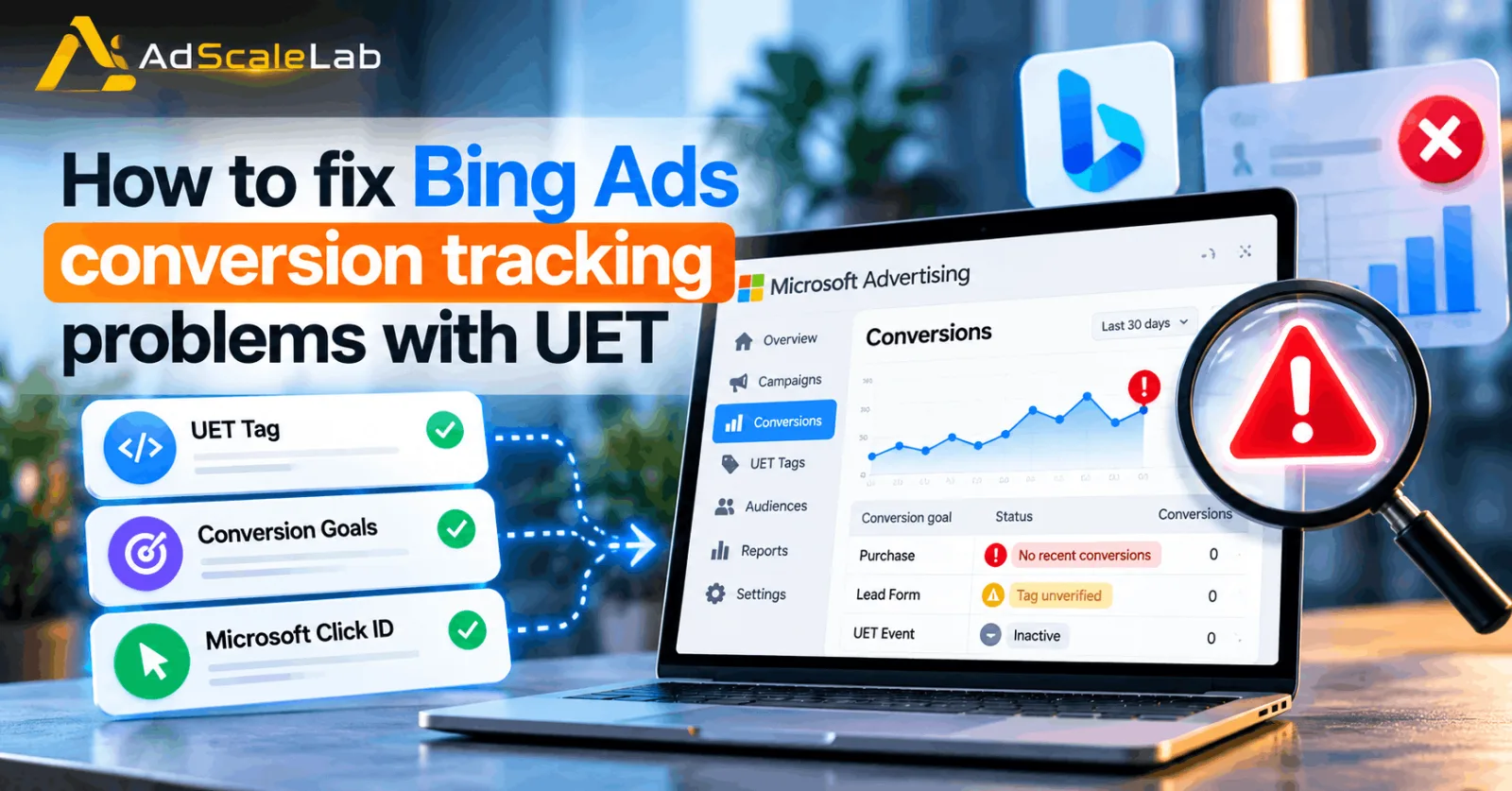
If your Bing Ads conversion tracking problems are making your Microsoft Advertising account show zero conversions, “No recent conversions,” or a UET tag that is not verified, the problem is usually somewhere in the tracking setup rather than the campaign itself.
Bing Ads is now part of Microsoft Advertising, but many advertisers still use the older name when talking about their campaigns. Microsoft uses Universal Event Tracking (UET) as the main website tracking system. A UET tag records what people do on your website, while conversion goals tell Microsoft Advertising which of those actions should count as conversions.
This distinction is important. A UET tag can be working while the conversion goal is configured incorrectly. The opposite can also happen: the goal can be created correctly, but the UET tag may not be firing on the page where the conversion happens. That is why fixing Bing Ads conversion tracking problems should be done step by step instead of immediately changing your bids, keywords or campaign budget.
In this guide, we will go through the most common problems and show how to check them in the right order.
Why Bing Ads Conversion Tracking Problems Happen
Microsoft Advertising needs reliable information about what happens after someone clicks an ad.
For example, an advertiser may want to count a purchase, lead form submission, registration, download or another important action as a conversion. Microsoft says UET can collect website activity and then use that information for conversion goals, remarketing and campaign optimization.
The problem is that several different pieces have to work together. The UET tag has to load on the website. The conversion goal has to use the correct UET tag. The conversion event has to match the goal configuration. If you are using custom events, the event parameters also have to match. And if your measurement depends on click identification, the Microsoft Click ID needs to be handled correctly.
So, when conversions suddenly disappear from Microsoft Advertising, there is more than one possible cause.
How To Fix Bing Ads Conversion Tracking Problems Step By Step
Step 1: Check Whether The UET Tag Is Actually Installed
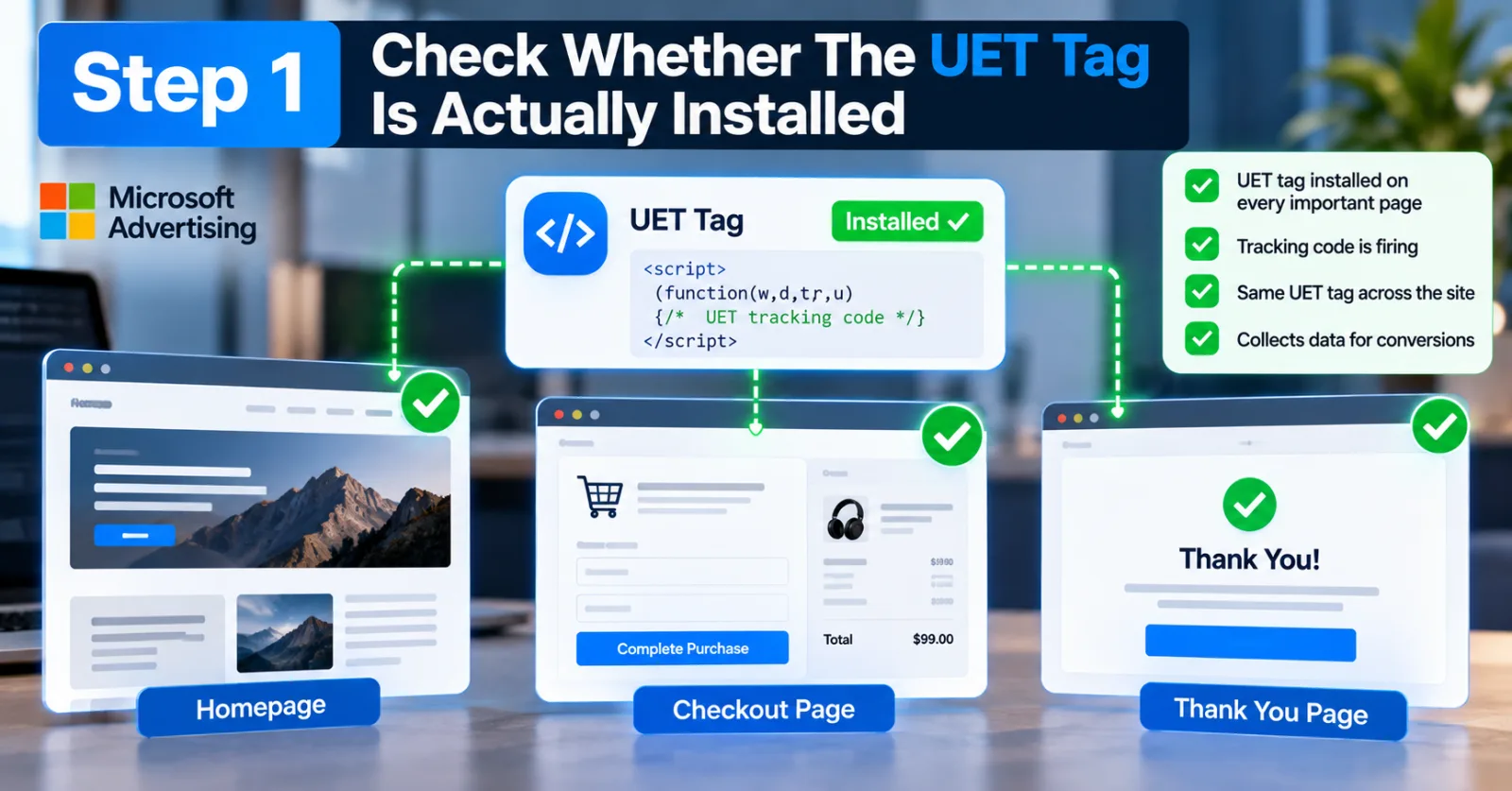
The first thing to check is your Universal Event Tracking tag.
Microsoft says advertisers should create a UET tag and add its tracking code to the website. The tag should normally be installed across the website so Microsoft can collect the activity needed for conversion tracking. This sounds simple, but it is one of the most common causes of tracking problems.
For example, imagine that your UET tag was installed on your homepage but not on your checkout or thank-you page. A visitor can click your ad, browse your website and eventually purchase, but Microsoft may not receive the information it needs from the conversion journey.
The same problem can happen after a website redesign.
A developer may replace the website template, move the tracking code into a new tag manager container or change the checkout system. The site still works normally for visitors, but the tracking code may no longer be firing. If you recently redesigned your website, changed your CMS, moved to a new checkout provider or changed your tag manager setup, check the UET installation before changing anything inside the campaign.
AdScaleLab also covers this during the initial setup process in its guide to Bing Ads account setup, because conversion tracking should be checked before spending heavily on a new account.
Step 2: Check The UET Tag Status In Microsoft Advertising
After checking the website, look at the tracking status inside Microsoft Advertising.
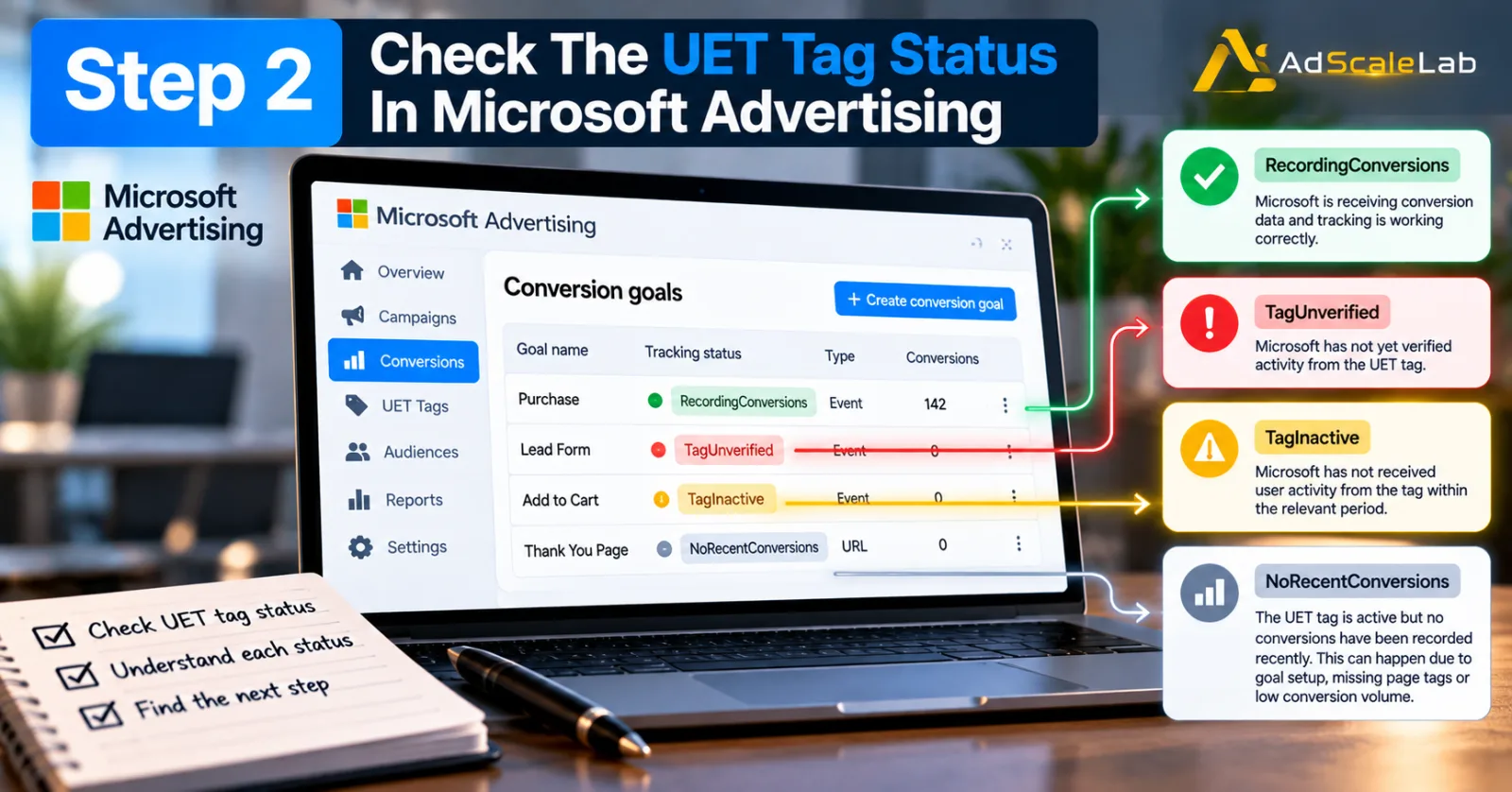
Microsoft has several system-generated statuses for conversion goals, including TagUnverified, TagInactive, NoRecentConversions and RecordingConversions. These statuses can tell you where to start looking.
For example, TagUnverified means Microsoft has not yet verified activity from the UET tag. TagInactive means Microsoft has not received user activity from the tag within the relevant period.
NoRecentConversions is different. It can mean that the UET tag is active but Microsoft has not recorded a conversion recently. Microsoft notes that this can happen because the goal is configured incorrectly, the relevant pages are not tagged, or there simply have not been any users who completed the conversion.
That difference matters.
If your status says TagInactive, focus on the UET implementation first. If it says NoRecentConversions, the tag may be working and the problem could be the conversion goal, the event configuration or simply a lack of conversions.
Step 3: Test the UET Tag With UET Tag Helper
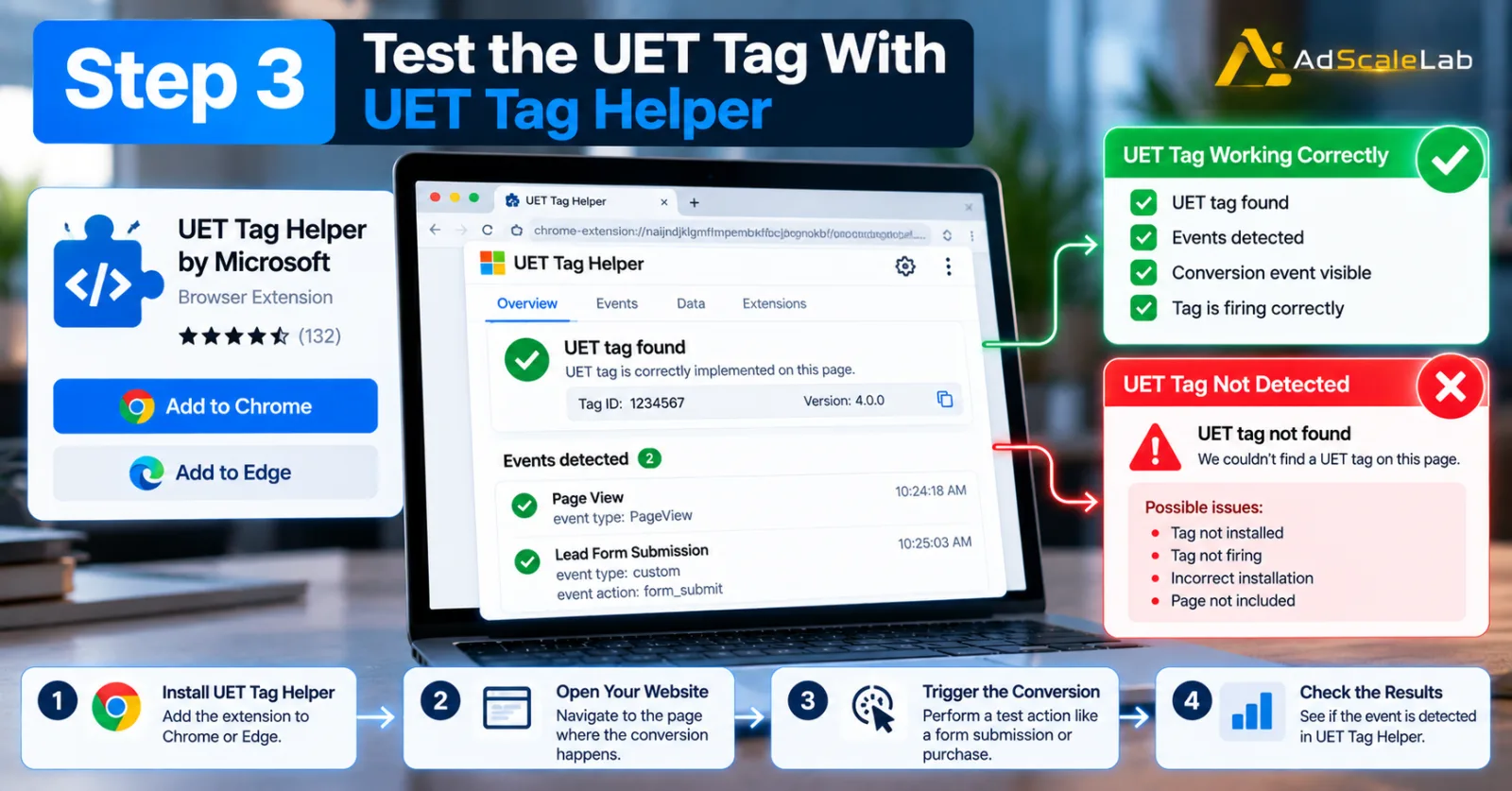
If you are not sure whether the tag is firing, use Microsoft's UET Tag Helper.
Microsoft describes UET Tag Helper as a browser extension that can validate UET implementation and help test conversion goals. It is available for Microsoft Edge and Google Chrome.
This is much better than simply looking at the source code and assuming the tag works. A tag can be present in the page source and still fail to send the expected information.
The useful part of the helper is that you can navigate through the website and try to trigger the conversion yourself. Microsoft says the tool can show whether a conversion was found or whether a problem was encountered, along with information about what was passed back to Microsoft Advertising.
For example, if your conversion is a lead form submission, perform a real test submission. If the helper detects the event, that is a good sign. If the helper does not detect it, do not start changing your campaign. Fix the tracking implementation first.
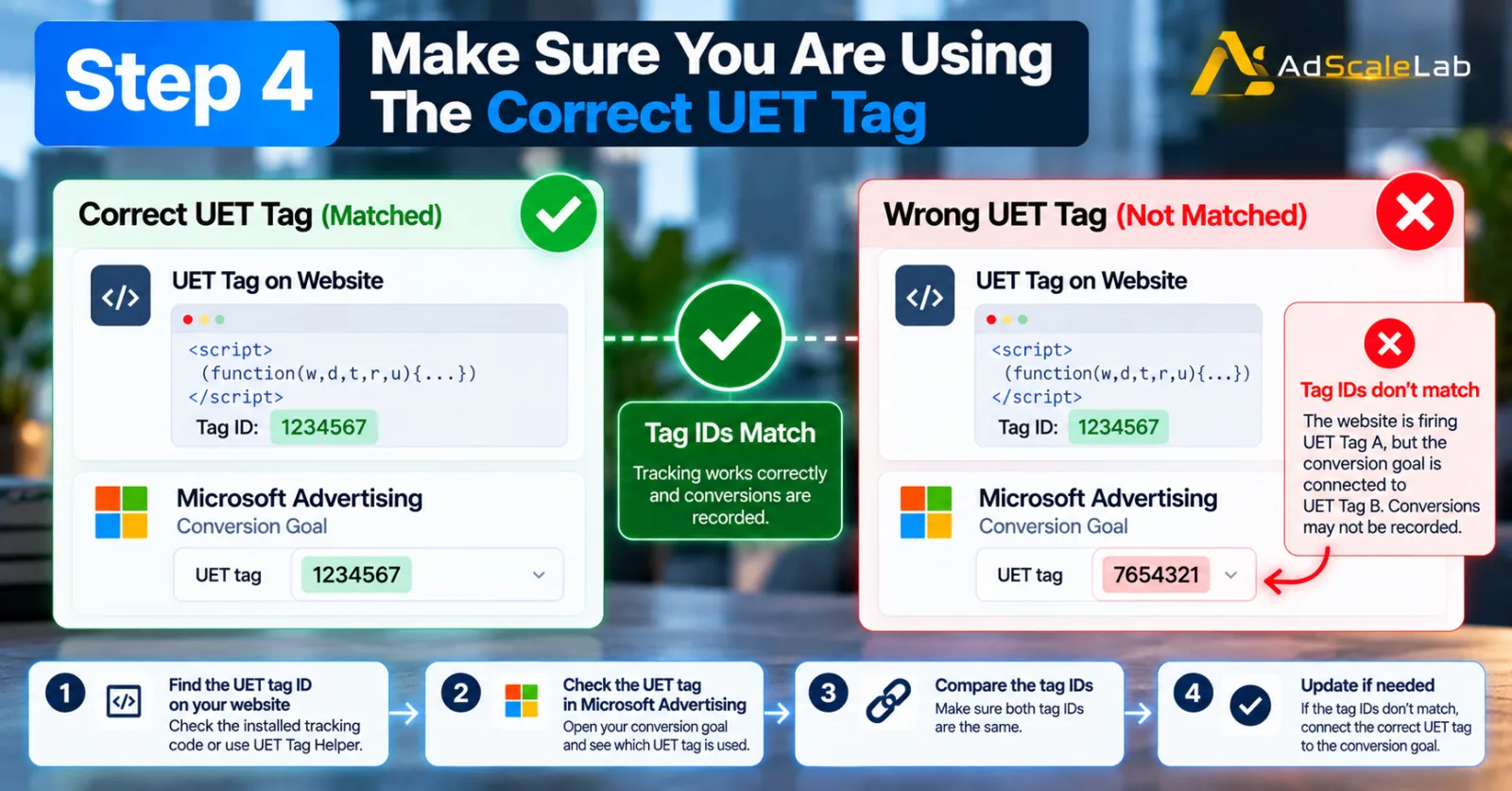
Step 4: Make Sure You Are Using The Correct UET Tag
Another easy mistake is having multiple UET tags and using the wrong one for a conversion goal.
Microsoft's documentation explains that one UET tag can be used with multiple conversion goals and audiences. It also warns advertisers to check existing tags before creating additional ones.
This becomes particularly important when an account has changed agencies, websites or tracking systems.
Imagine that the website is firing UET Tag A, but your conversion goal is connected to UET Tag B. The website can appear to be tracking correctly while the conversion goal connected to the account is not receiving the expected information.
So compare the tag ID installed on your website with the UET tag associated with the conversion goal. If they do not match, correct the setup before doing anything else.
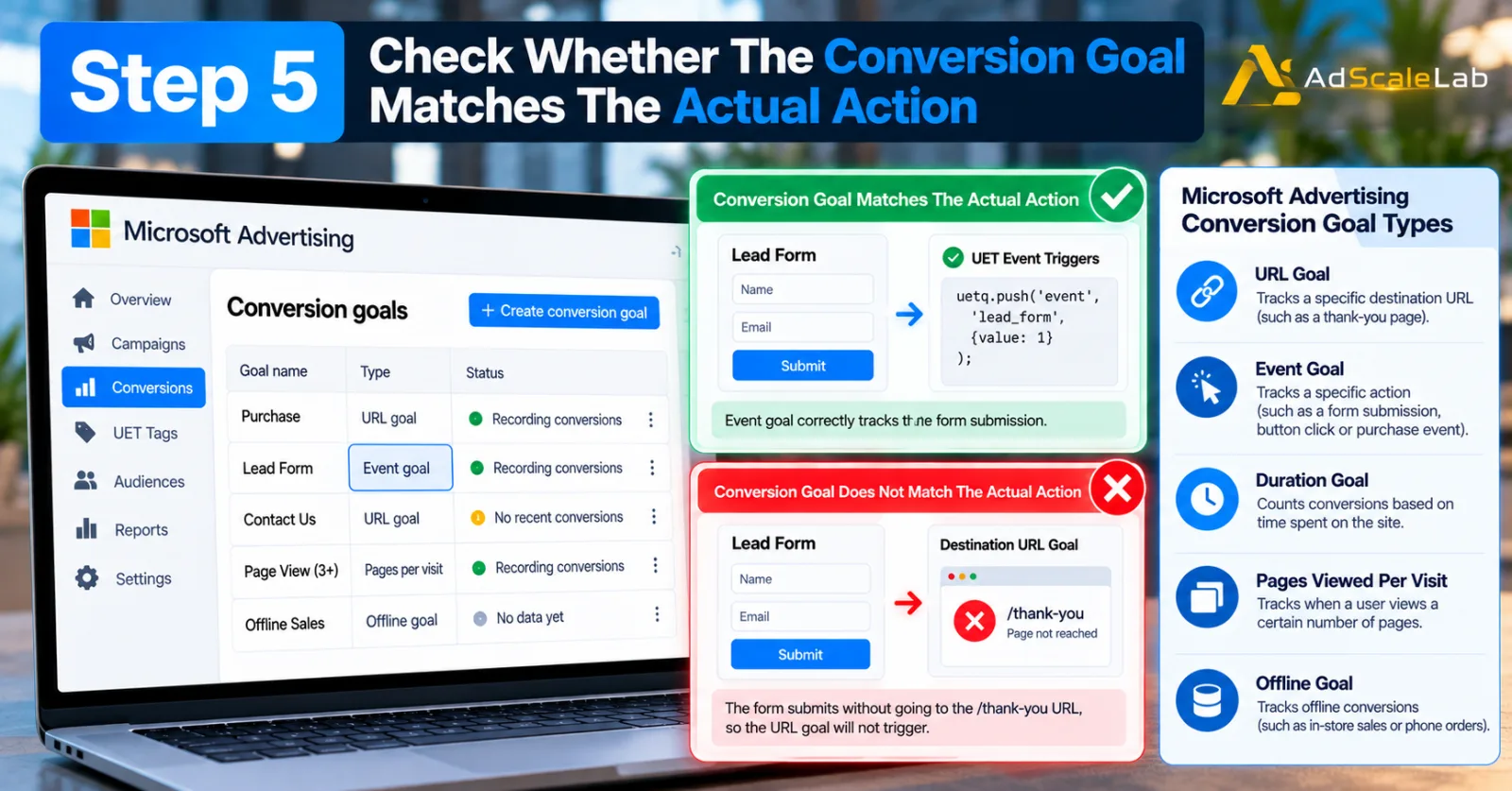
Step 5: Check Whether The Conversion Goal Matches The Actual Action
A working UET tag does not automatically mean your conversion goal is correct.
Microsoft explains that UET records website activity, while conversion goals define which actions should count as conversions.
For example, suppose your goal is supposed to track a completed lead form.
If you created a destination URL goal that expects visitors to reach /thank-you, but your website now submits the form without sending the visitor to that URL, the goal may never trigger. In that situation, the UET tag could be perfectly healthy.
The problem is the goal definition. Microsoft supports different conversion goal types, including URL, duration, pages viewed per visit, event and offline conversion goals. Event goals can be used when you need to track a specific action rather than simply reaching a particular URL.
So ask a simple question:
What exactly should count as the conversion? Then check whether the goal is configured to recognize that exact action.
Step 6: Check Custom Event Parameters Carefully
Custom event tracking creates another area where small mistakes can stop conversions from being recorded.
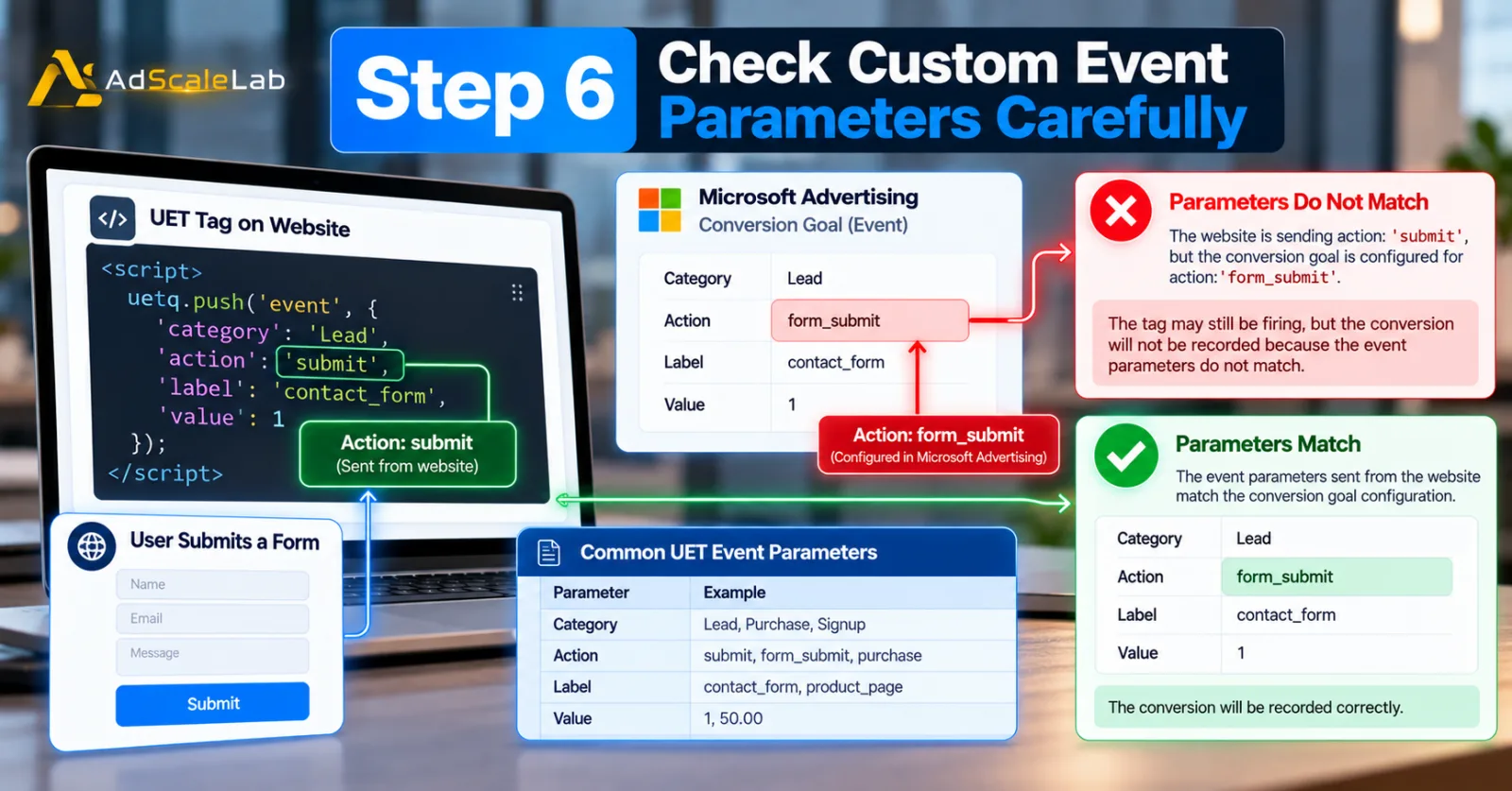
For an event goal, Microsoft Advertising can use event information such as category, action, label and value. The UET implementation has to send information that matches the conversion goal configuration.
Imagine your website sends:
Action: submit
But your Microsoft Advertising conversion goal is configured for:
Action: form_submit
The tag may still be firing.
Microsoft may still be receiving website activity. But the specific conversion goal may not match the event being sent. This is why testing the actual conversion event is important.
Do not only check whether UET appears on the page. Check what happens when the visitor performs the action you want to count.
Step 7: Check Your Microsoft Click ID And Auto-Tagging
Another important part of Bing Ads conversion tracking problems is the Microsoft Click ID, commonly called MSCLKID.
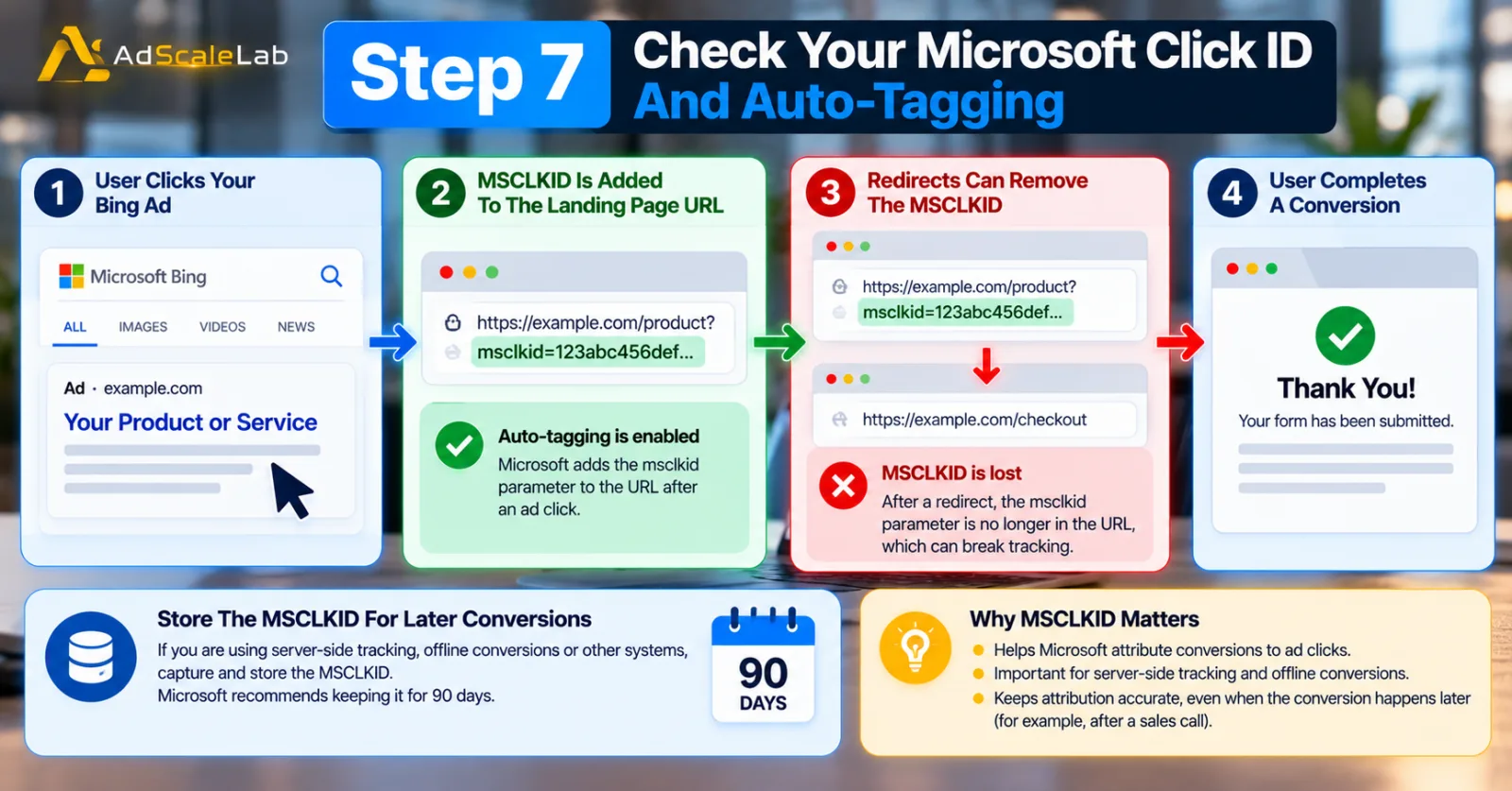
When Microsoft Advertising auto-tagging is enabled, Microsoft can add an msclkid parameter to the landing-page URL after an ad click. Microsoft describes MSCLKID as a click identifier used to help attribute conversions to ad clicks. This becomes especially important if you are using server-side tracking, offline conversions or other systems that need to connect a later conversion back to the original ad click.
If the click ID is lost during redirects, tracking can become more difficult.
For example, a user clicks your Microsoft ad and lands on:
example.com/product?msclkid=...
Then the user is redirected to another URL and the click ID disappears. If your later conversion process depends on that identifier, the connection between the ad click and conversion can be weakened.
Microsoft recommends capturing and storing the MSCLKID when using Conversions API, with a suggested retention period of 90 days. This is particularly relevant for businesses where the conversion happens much later, such as lead-generation campaigns where sales teams contact the lead before the final sale.
Step 8: Check Whether Consent Settings Are Blocking Measurement
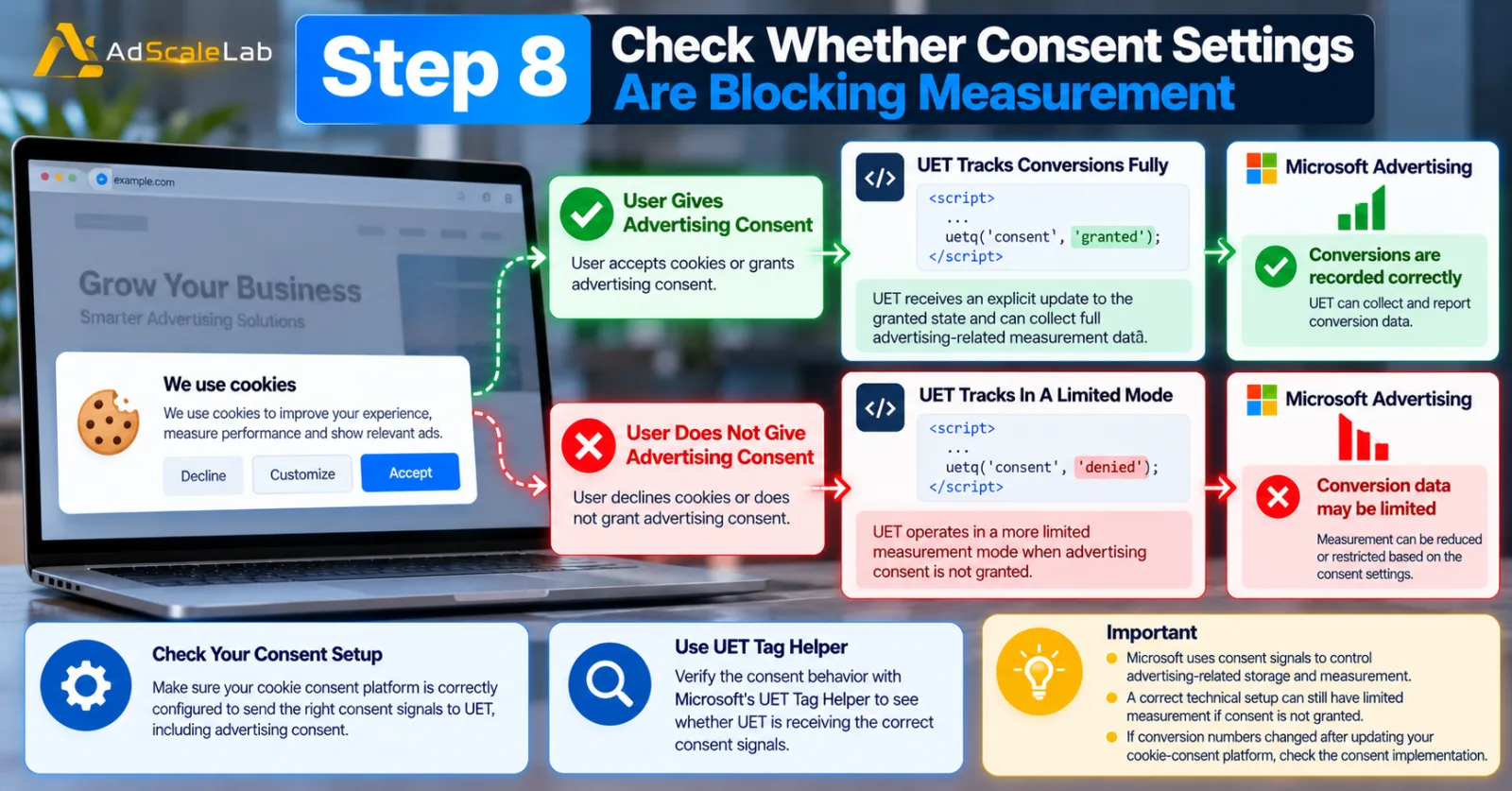
Privacy settings can also affect conversion measurement. Microsoft introduced Consent Mode for UET and later expanded its guidance with Advanced Consent Mode. The system uses consent signals to control advertising-related storage and measurement behavior.
This means a tracking setup can appear technically correct while measurement is still affected by the consent configuration.
For example, if a user has not granted the required advertising consent, UET may operate in a more limited measurement mode. Microsoft's 2026 Advanced Consent Mode guidance says that when consent is granted, UET should receive an explicit update to the granted state. Microsoft also recommends using UET Tag Helper to verify the consent behavior.
So, if conversion numbers changed after implementing or changing a cookie-consent platform, do not assume the campaign suddenly stopped working. Check the consent implementation.
Step 9: If You Use Google Tag Manager, Check The Actual Tag Firing
Many advertisers implement Microsoft Advertising through Google Tag Manager or another tag management system.
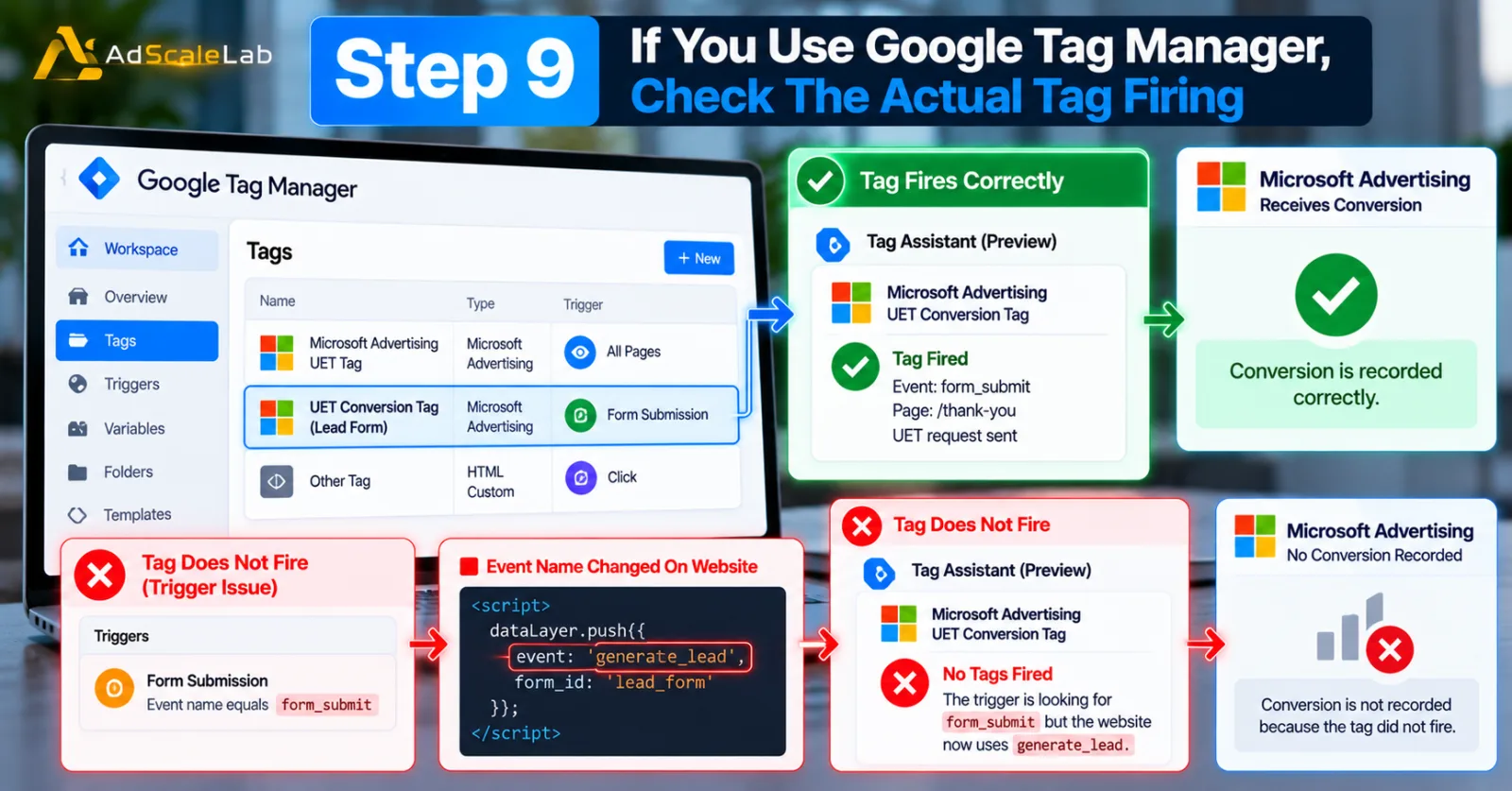
That can make deployment easier, but it also creates another layer where something can go wrong. The Microsoft Advertising tag may exist inside the container but fail to fire because the trigger changed.
For example, a developer could change the form submission event from:
form_submit
to:
generate_lead
The website may still work normally, but the Microsoft Ads conversion tag may no longer fire because the trigger is looking for the old event. This is why it is useful to test the conversion inside the tag manager and then verify what Microsoft Advertising actually receives.
Microsoft's own troubleshooting guidance recommends using UET Tag Helper to test the conversion and inspect problems rather than assuming that a tag manager preview alone proves everything is working.
Step 10: Wait Before Deciding That Tracking Is Broken
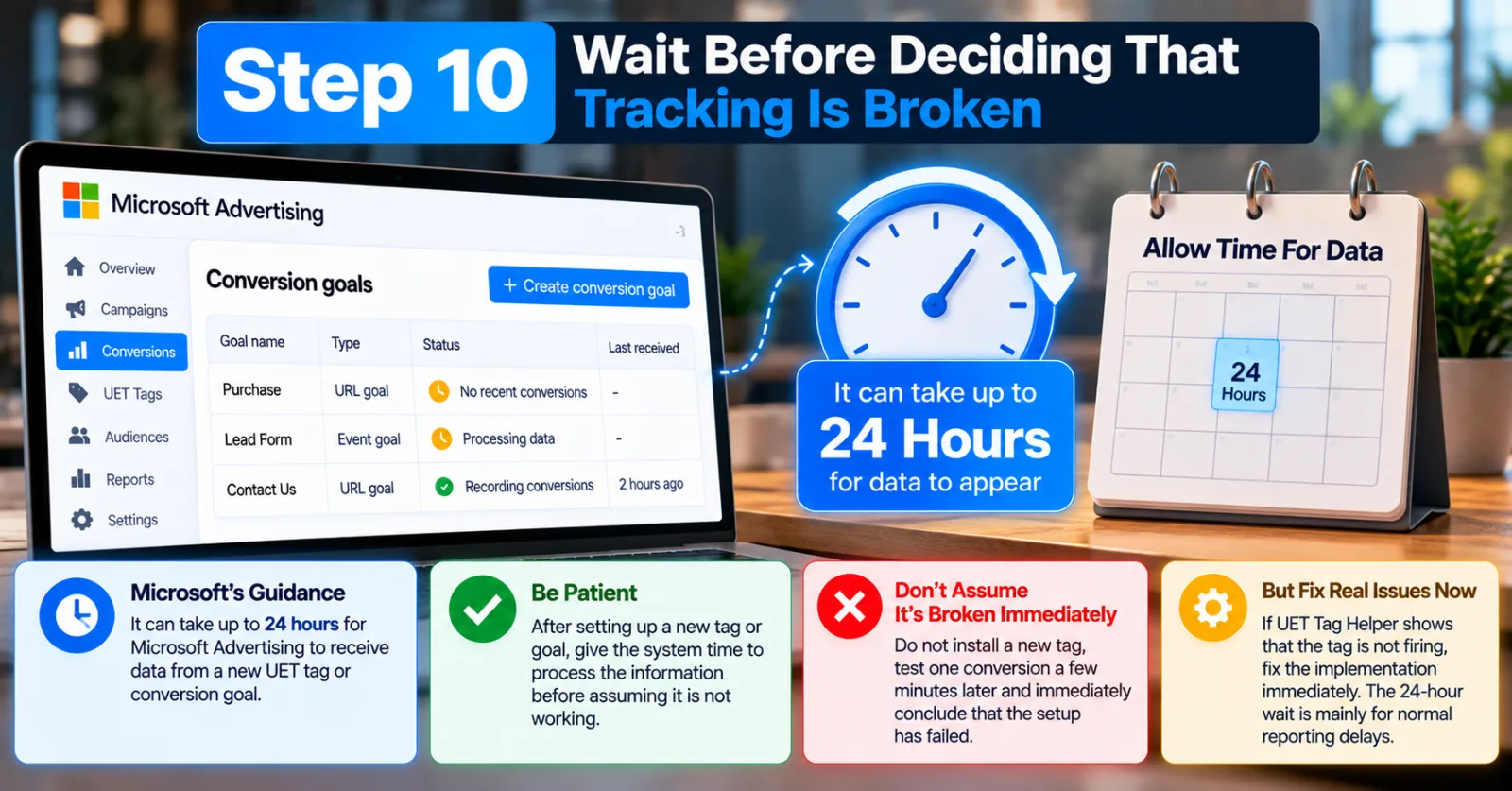
Sometimes nothing is actually broken. New UET tags and conversion goals can take time before data appears in Microsoft Advertising.
Microsoft's troubleshooting guidance says it can take up to 24 hours for Microsoft Advertising to receive data from a new UET tag or conversion goal. That means you should not install a new tag, test one conversion five minutes later and immediately conclude that the setup has failed.
Give the system time to process the information. At the same time, waiting does not mean ignoring a clearly broken tag.
If UET Tag Helper shows that the tag is not firing, fix that immediately. The 24-hour point is mainly useful for understanding reporting delays after a legitimate setup or change.
What If UET Is Working But Conversions Still Show As Zero?
This is one of the most confusing situations for advertisers.
You open your website. UET Tag Helper says the tag is working. You trigger the event. The event appears to be sent. But Microsoft Advertising still shows No recent conversions.
At this point, go back to the conversion goal itself. Check whether the goal is active, whether it is connected to the correct UET tag, and whether the event parameters match the goal.
Also remember that Microsoft Advertising and analytics platforms can use different attribution methods. Microsoft's support guidance notes that Microsoft Advertising reports conversions based on the date of the ad click, while some other analytics systems may report them based on the date the conversion occurred. Because of these differences, some reporting discrepancies are expected.
So if Microsoft Ads reports 10 conversions while another analytics system reports 8, that does not automatically mean one system is broken. First compare the definitions, attribution windows and reporting dates.
What If You Are Tracking Offline Conversions?
Offline conversions are common for B2B businesses and lead-generation campaigns.
A person may click a Microsoft ad, fill out a form and then become a customer several days later after a sales call. In that case, the website form submission may not be the final business outcome. Microsoft Advertising supports offline conversion scenarios, and its newer Conversions API (CAPI) can send website events, CRM events, offline sales transactions and mobile events to Microsoft Advertising.
Microsoft also recommends using identifiers such as MSCLKID where available to help connect conversion events back to ad interactions. If your business has a long sales cycle, this can be more useful than relying only on a browser-side conversion event.
However, server-side tracking adds its own technical requirements. If you send the same conversion through UET JavaScript and CAPI, Microsoft recommends using compatible event information and the same stable eventId for deduplication so the same conversion is not counted twice.
When Should You Consider Enhanced Conversions?
Enhanced Conversions are another option when advertisers want to improve measurement using additional first-party information.
Microsoft says Enhanced Conversions can improve conversion measurement accuracy and support cross-device conversion attribution using hashed, privacy-safe information. This is not the first thing I would change when a brand-new UET tag is not working.
First make the basic setup work.
Once the standard conversion tracking is functioning correctly and you have reliable first-party conversion data, enhanced measurement can be considered as a separate improvement. That keeps troubleshooting much easier because you are not trying to fix five different tracking systems at the same time.
How To Find The Real Cause Of Bing Ads Conversion Tracking Problems
When conversion tracking stops working, avoid changing everything at once.
Use this order:
UET tag → UET status → UET Tag Helper → correct UET tag → conversion goal → event parameters → MSCLKID → consent → reporting delay → advanced measurement
This order matters because it moves from the basic tracking layer toward the more advanced attribution layer. If the UET tag itself is not working, there is no reason to spend an hour investigating campaign bidding. If UET is working but the conversion goal is wrong, changing keywords will not solve the problem.
And if everything is technically correct but another analytics platform reports a different number, you may be dealing with attribution differences rather than a tracking failure.
Final Thoughts
Bing Ads conversion tracking problems can look complicated because several different systems are involved, but most troubleshooting starts with a few basic questions.
Is the UET tag installed?
Is it firing?
Is Microsoft Advertising receiving activity?
Is the correct UET tag connected to the conversion goal?
Does the conversion goal match the action happening on the website?
Are custom event parameters correct?
Is the Microsoft Click ID being preserved when it matters?
Are consent settings affecting measurement?
And finally, has enough time passed for the data to appear?
Microsoft's own documentation makes UET the foundation of its website conversion tracking system, so that is where advertisers should start. Once the basic tracking works, you can move into more advanced options such as Conversions API and Enhanced Conversions. The most important lesson is not to treat a missing conversion number as a campaign-performance problem immediately.
Sometimes the campaign is getting conversions. The tracking simply isn't telling Microsoft Advertising about them. And that is a very different problem.
Agency ad accounts, without the wait.
Buy and top up Google, Meta, native, and more from one dashboard.
Get started
No comments yet. Be the first to comment.
Comments are open to registered AdScaleLab clients.
Sign in to comment